Organization User Roles and Permissions
Polar Signals Cloud uses a role-based access control (RBAC) system to manage user and service account permissions. Roles define sets of permissions, and these roles are assigned to users or service accounts through role bindings.
Understanding the IAM System
The IAM system consists of three main components:
- Roles: Collections of permissions that define what actions can be performed
- Role Bindings: Assignments that grant a specific role to a user or service account
- Permissions: Individual capabilities like
data.read,data.write,project.create, etc.
System Roles
Polar Signals Cloud provides several built-in system roles:
Owner
The Owner role has full access to the organization and can perform all management actions. This includes:
- Viewing profiling reports
- Creating, updating, and deleting projects
- Managing service accounts and tokens
- Creating and managing role bindings
- Inviting users
- Configuring Single Sign-On (SSO)
- Managing billing
- Creating custom roles
- Deleting the organization
Viewer
The Viewer role has read-only access to the organization. This includes:
- Viewing profiling reports
- Viewing projects
- Listing organization resources
Writer
The Writer role can send observability data to projects. This includes:
- All permissions from the Viewer role
- Writing observability data (
data.write) - Writing debug information (
debuginfo.write)
This role is ideal for service accounts used by profiling agents.
Profile Writer
The Profile Writer role is a specialized role for sending only observability data:
- Writing observability data (
data.write)
This role is ideal for service accounts that only need to send data, without any read access.
Debug Info Writer
The Debug Info Writer role is a specialized role for uploading debug information:
- Writing debug information (
debuginfo.write)
This role is ideal for service accounts or CI/CD pipelines that upload debug symbols.
Managing User Roles
Viewing Role Bindings
To view who has access to your organization:
- Go to your organization settings
- Navigate to the Identity & Access Management tab
- Select the Role Bindings section
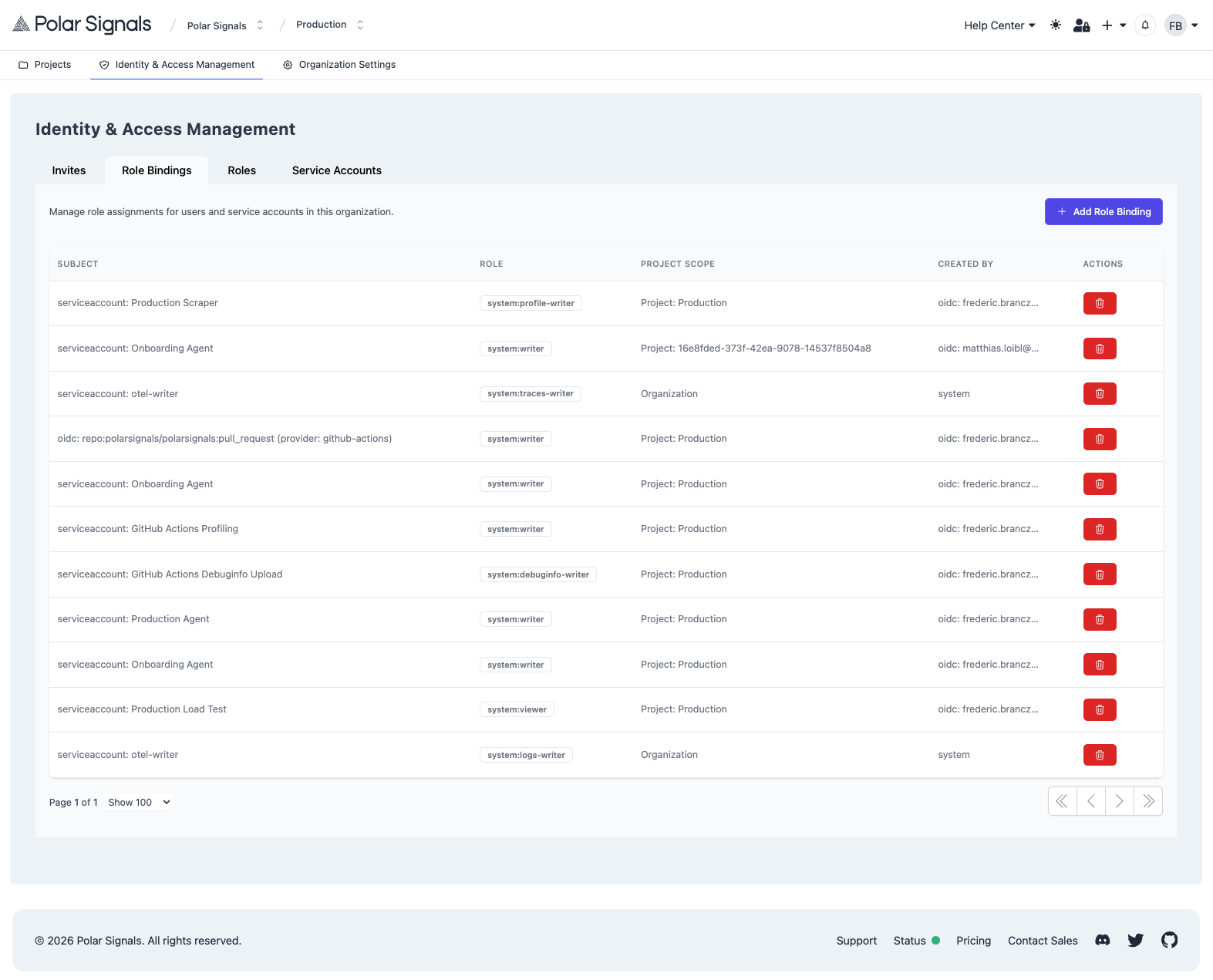
Here you can see all users and service accounts along with their assigned roles.
Granting Roles to Users
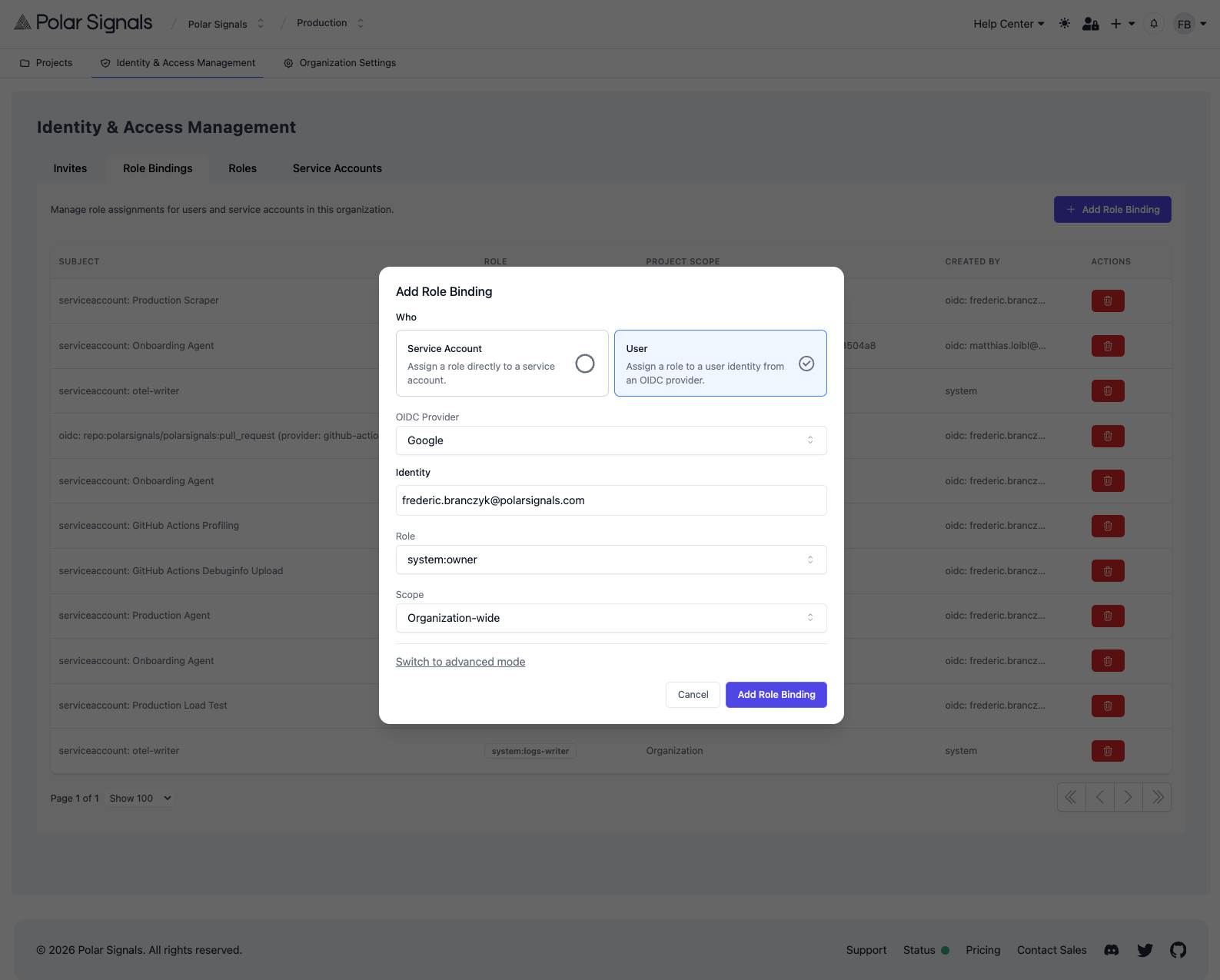
To grant a role to a user:
- Go to the Role Bindings section in the Identity & Access Management tab
- Click Create Role Binding
- Select the user as the subject
- Select the role to assign
- Optionally, scope the role binding to a specific project
- Click Create
Changing User Roles
To change a user's role:
- In the Role Bindings section, find the role binding you want to modify
- Delete the existing role binding
- Create a new role binding with the desired role
You cannot remove the last Owner role binding from an organization. Make sure there is at least one Owner in the organization at all times.
Removing User Access
To remove a user's access:
- Go to the Role Bindings section
- Find all role bindings for the user
- Click Delete on each role binding
Custom Roles
Organizations can create custom roles with specific sets of permissions tailored to their needs.
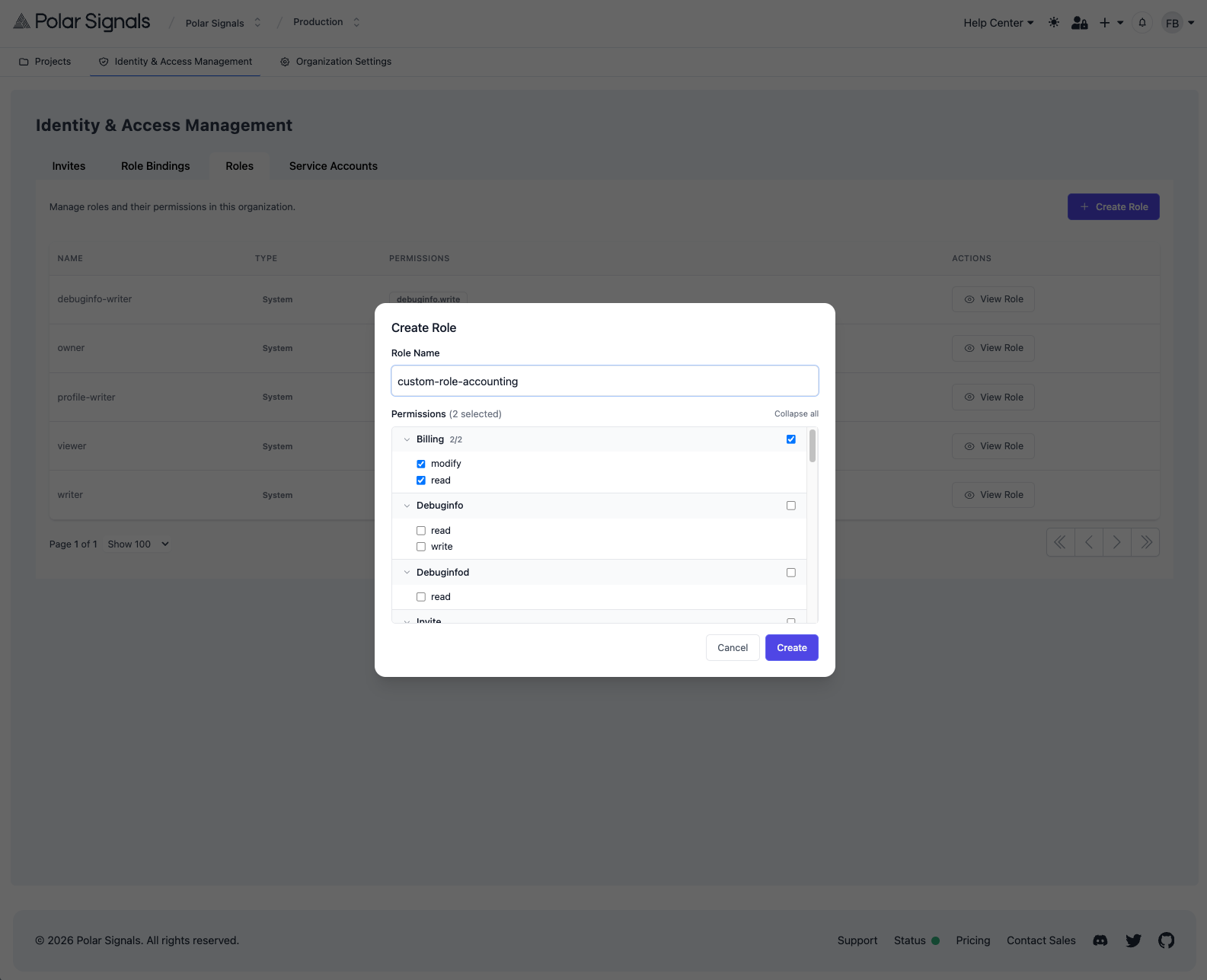
Creating a Custom Role
- Go to your organization settings
- Navigate to the Identity & Access Management tab
- Select the Roles section
- Click Create Role
- Enter a name for the role
- Select the permissions to include
- Click Create
Available Permissions
Permissions are organized by resource type:
Observability Data:
data.read- View observability data (profiles, logs, traces, and metrics)data.write- Send observability data (profiles, logs, traces, and metrics)
Projects:
project.read- View project detailsproject.list- List projectsproject.create- Create new projectsproject.update- Modify projectsproject.delete- Delete projects
Views:
view.read- View saved viewsview.list- List viewsview.create- Create viewsview.update- Modify viewsview.delete- Delete views
Organization:
organization.read- View organization detailsorganization.update- Modify organization settingsorganization.delete- Delete organizationorganization.usage.read- View usage data
Service Accounts:
serviceaccount.list- List service accountsserviceaccount.create- Create service accountsserviceaccount.delete- Delete service accountsserviceaccounttoken.list- List tokensserviceaccounttoken.create- Create tokensserviceaccounttoken.delete- Delete tokens
IAM Management:
role.list- List rolesrole.create- Create custom rolesrole.delete- Delete custom rolesrolebinding.list- List role bindingsrolebinding.create- Create role bindingsrolebinding.delete- Delete role bindingsinvite.list- List invitesinvite.create- Create invitesinvite.expire- Expire invites
Debug Info:
debuginfo.list- List debug informationdebuginfo.read- Read debug informationdebuginfo.write- Upload debug information
Billing:
billing.read- View billing informationbilling.modify- Modify billing settings
Project-Scoped Role Bindings
Role bindings can optionally be scoped to a specific project. When scoped, the permissions only apply within that project's context.
For example, you might grant a user the Viewer role scoped to a specific project, allowing them to view profiling data only for that project.
To create a project-scoped role binding:
- When creating a role binding, check the Scope to project option
- Select the project from the dropdown
- Complete the role binding creation
Service Account Roles
Service accounts (used for API authentication) can be granted roles just like users. This is essential for:
- Profiling agents that need to send data (use Writer or Profile Writer role)
- CI/CD pipelines that upload debug symbols (use Debug Info Writer role)
- Automation scripts that query data (use Viewer role)
See the Generating Tokens documentation for details on creating service accounts and assigning them roles.